What Tax Summary is
Tax Summary is a report in Jeramyl that organises your bookkeeping records into a view designed to help you prepare for tax season. It shows an estimate of your taxable income and deductible expenses based on the transactions, categories, and amounts you have recorded in Jeramyl for a given period.
Tax Summary is a bookkeeping tool — it helps you organise your financial records so you and your accountant or tax professional can review them efficiently. It is not tax advice, and it does not file, submit, or prepare a tax return on your behalf.
Tax Summary is an estimate based on the records entered in Jeramyl. It is not tax advice. The figures shown may not reflect your actual tax liability. Always confirm your tax position with a qualified accountant or tax professional before filing.
When to use Tax Summary
Tax Summary is most useful at the end of a financial year or tax period, when you need a clear picture of your income and expenses to share with your accountant. It is also useful throughout the year as a progress check — to see whether your categories and records are in order before year-end arrives.
- Before meeting with your accountant or tax professional
- At the end of your financial year or tax period
- When preparing records to share with a bookkeeper
- As a quarterly or mid-year check on your income and expense categories
- When estimating your tax position for cash flow planning purposes
Run Month-end Cleanup and resolve all flagged items before reviewing Tax Summary. Missing receipts and uncategorized transactions reduce the accuracy of the estimate.
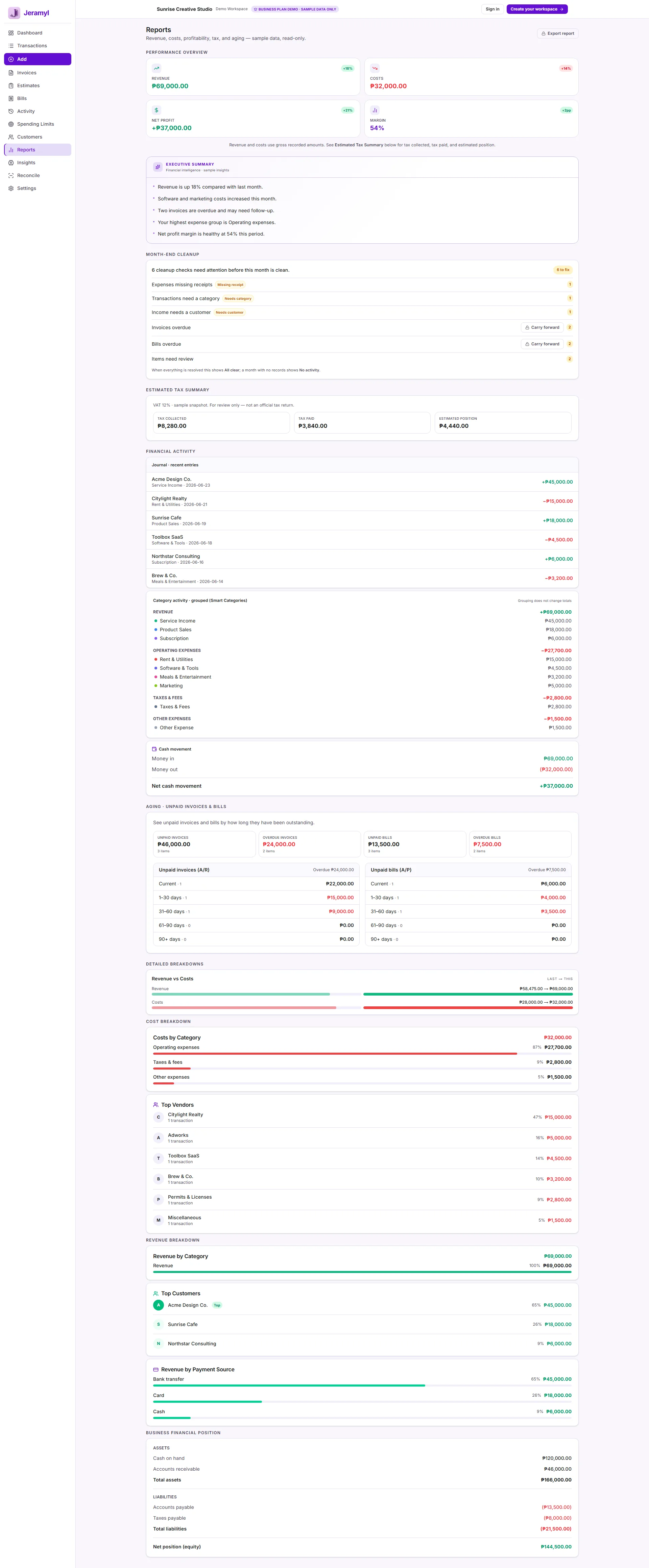
Open Reports and Tax Summary
- In the sidebar, click Reports.
- From the Reports section, select Tax Summary.
- Choose the date range or financial year you want to review.
- The report loads with an estimated breakdown of income and expenses for the selected period.
Choose the correct tax view
Tax Summary may offer different views or groupings depending on how your records are structured. Before reviewing the figures, confirm you are looking at the right period and the right grouping:
- Date range: Set the date range to match your financial year or the tax period you are reporting on. The numbers shown are only as accurate as the date range you select.
- Income vs. expenses: Tax Summary separates income and expenses so you can see each side clearly. Confirm both sides reflect the transactions you expect for the period.
- Category grouping: Expenses are grouped by the bookkeeping categories you have assigned. If categories are inconsistent or missing, the grouping will be incomplete.
If your financial year does not align with the calendar year, set a custom date range to match your actual tax period. Jeramyl does not know your jurisdiction's tax year automatically — you set the dates manually.
Review income and expenses
Work through the income and expense figures in Tax Summary before sharing them with your accountant:
Income
- Confirm the total income figure looks correct for the period.
- Check that invoices marked as paid during the period are included.
- Look for any income transactions that may have been recorded in the wrong period or with the wrong date.
Expenses
- Confirm the total expense figure looks correct.
- Check that major recurring expenses — subscriptions, rent, payroll, materials — are all present.
- Look for any transactions recorded in the wrong period or missing from the list entirely.
If a figure looks unexpectedly high or low, drill into the relevant transactions from the Transactions list and check the dates, amounts, and categories before concluding there is an error.
Compare the Tax Summary total income to your Invoices list for the same period. If they diverge significantly, look for invoices that were created but not marked as paid, or income transactions recorded without a corresponding invoice.
Review categories
Categories are the foundation of a useful Tax Summary. Each expense transaction is grouped under the bookkeeping category you assigned when recording it. If categories are missing or incorrect, the Tax Summary breakdown will be incomplete or misleading.
When reviewing categories in Tax Summary:
- Check that each expense category makes sense for the type of spending it represents.
- Look for a catch-all or "Other" category with a large total — this may indicate many transactions that were never properly categorized.
- Check for any categories that seem too large or too small given what you know about your spending.
- If you use a category name inconsistently — for example, "Software" and "Software subscriptions" as separate categories — consider consolidating them for cleaner reporting.
To fix category issues, go to Transactions, filter by the relevant category or date range, and update the category on any transactions that need correcting. The Tax Summary will reflect corrections the next time it loads.
Ask your accountant which expense categories they prefer to see when reviewing your records. Aligning your Jeramyl categories with their preferred structure makes the handoff smoother each tax season.
Check missing receipts and uncategorized items
Missing receipts and uncategorized transactions reduce the accuracy of Tax Summary because they represent incomplete records. Before treating Tax Summary as a reliable estimate, resolve as many of these as possible.
Find and fix missing receipts
Go to Transactions and filter for transactions flagged with Missing receipt. For each one, attach the receipt if you have it or note in the description why a receipt is unavailable. See the Upload Receipt guide for step-by-step instructions.
Find and fix uncategorized transactions
Filter Transactions for items flagged with Needs category. Assign the correct bookkeeping category to each one. Uncategorized transactions do not appear in the Tax Summary expense breakdown, which means the total may be understated.
Use Month-end Cleanup
Running Month-end Cleanup before reviewing Tax Summary is the most efficient way to clear missing receipts and uncategorized items in bulk. The cleanup queue surfaces all flagged transactions in one place and lets you resolve them quickly.
Export for accountant review
When your records are in order, export the Tax Summary and your transaction data to share with your accountant or tax professional. Jeramyl's export gives them the structured information they need to review your records and prepare your return.
- Open Reports → Tax Summary and confirm the date range is set correctly.
- Click the Export or Download button in the report header.
- Save the CSV or PDF file.
- Share the file with your accountant or tax professional along with any supporting notes about the period.
When sharing with your accountant, include a note about any transactions you were unsure how to categorize, any large or one-off items, and any periods where records may be incomplete. This context helps them review your records efficiently and ask the right questions.
What Tax Summary does not do
Understanding what Tax Summary does not do is as important as knowing what it does:
- Tax Summary is not tax advice. The figures shown are an estimate based on your bookkeeping records. Jeramyl does not know your tax jurisdiction, entity type, deduction eligibility, or personal circumstances. Always confirm your tax position with a qualified accountant or tax professional.
- Jeramyl does not file taxes. Tax Summary is a reporting tool. It does not submit any information to a tax authority, prepare a tax return, or interact with any government filing system.
- Jeramyl does not guarantee tax accuracy. The Tax Summary reflects only what has been recorded in Jeramyl. If transactions are missing, miscategorized, recorded in the wrong period, or based on incorrect amounts, the estimate will be off. Accuracy depends on the quality of your records.
- Jeramyl does not replace your accountant. Tax Summary helps you organise and share your bookkeeping records. A qualified accountant or tax professional reviews those records, determines what is deductible, and prepares or reviews your actual tax filing.
- Tax Summary does not know your deduction eligibility. Whether a particular expense is tax-deductible in your jurisdiction is a tax question, not a bookkeeping question. Recording an expense in Jeramyl does not make it deductible.
Best practices
- Run Month-end Cleanup every month so that missing receipts and uncategorized items do not accumulate before tax season.
- Assign consistent, meaningful category names to all transactions — this makes your Tax Summary breakdown easier to review and share.
- Set the correct date range before reviewing Tax Summary — the estimate is only as accurate as the period you select.
- Review both income and expense totals for obvious gaps or unexpected figures before sharing the report.
- Export Tax Summary and share it with your accountant or tax professional in advance of your filing deadline — do not leave it to the last week.
- Note any large or unusual transactions when sharing with your accountant so they can ask the right questions.
- Do not rely on Tax Summary alone to determine how much tax you owe — always get a professional review before filing.
FAQ
Tax Summary is an estimate based on the records entered in Jeramyl. Its accuracy depends on how complete and correctly categorized your transactions are. It does not account for your specific tax jurisdiction, deduction eligibility, entity type, or any adjustments your accountant may need to make. Always confirm with a qualified accountant or tax professional before filing.
No. Jeramyl does not file taxes, prepare tax returns, or submit information to any tax authority. Tax Summary is a bookkeeping report that helps you organise your records. Your accountant or tax professional handles the filing.
If figures look unexpectedly high or low, check the following: the date range is set to the correct period; transactions are not missing from the list; categories are assigned to all expenses; no transactions are recorded in the wrong period or with incorrect amounts; receipts are attached and amounts match. Fixing these issues will update the estimate the next time the report loads.
No. Recording an expense in Jeramyl is a bookkeeping action — it tracks that the expense happened. Whether it is deductible depends on your jurisdiction, business type, and the nature of the expense. Your accountant or tax professional determines deduction eligibility, not Jeramyl.
Export Tax Summary as a CSV or PDF from the Reports section and send the file to your accountant directly. You can also export your full transaction list if your accountant wants the underlying records. Include a note about the period and any items you are unsure about to make their review faster.
You can use Tax Summary as one input when estimating your quarterly tax position — it gives you a view of income and expenses to date. However, it is an estimate and does not account for all factors that affect your actual tax liability. For quarterly tax payments, discuss the figures with your accountant before making a payment.