What transactions are
Transactions are the income and expenses recorded in your Jeramyl workspace. Every amount of money coming into or going out of your business should be represented as a transaction — whether it is a payment received from a customer, a software subscription, a supplier invoice, a bank fee, or any other financial event.
Transactions form the foundation of all your bookkeeping records in Jeramyl. Reports, Tax Summary, cash flow visibility, and Month-end Cleanup all depend on the quality and completeness of your transaction records. The more complete and accurately categorized your transactions are, the more useful your records become.
Why categories matter
Categories are how Jeramyl organises your transactions into meaningful groups. When you assign a category to a transaction — such as "Software", "Rent", "Marketing", or "Sales" — that transaction appears under the right heading in your expense breakdown, Profit & Loss report, and Tax Summary.
Without categories, transactions are just a list of numbers. With consistent categories, your records become useful: you can see where money is going, identify patterns, prepare for tax season, and share clean records with your accountant or bookkeeper.
Categories are a bookkeeping tool for organising your records — they are not tax advice. The category you assign to a transaction does not determine whether it is tax-deductible or how it should be treated for tax purposes. Always confirm category choices with your accountant or bookkeeper before relying on them for tax reporting.
Open the Transactions page
- In the sidebar, click Transactions.
- The Transactions list opens showing your full history of income and expense records, sorted by date.
- Flagged transactions — those needing a category, a receipt, or a customer — appear with status chips so you can identify them quickly.
- Use the search bar, date filter, or type filter to narrow the list to the records you want to review.
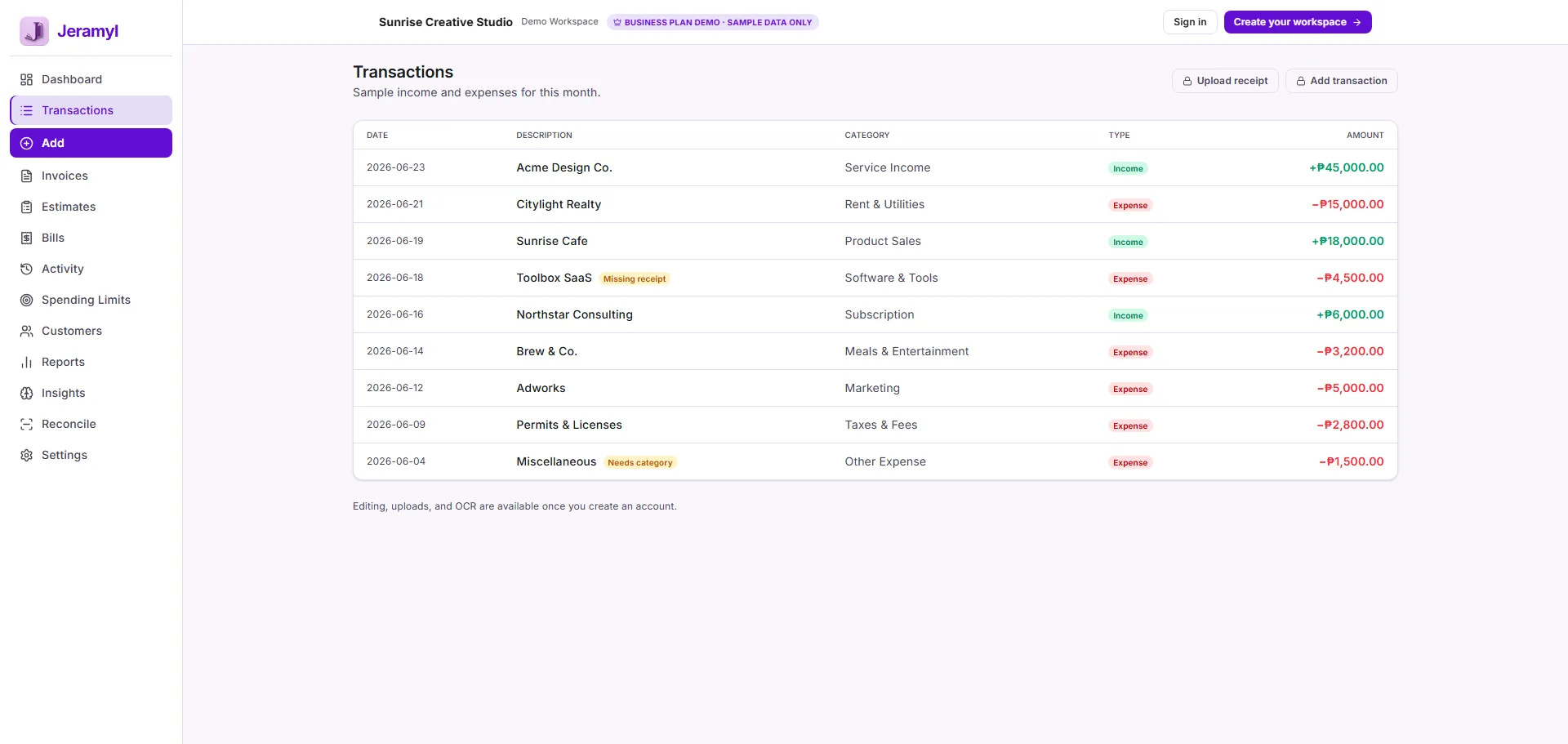
Review income and expense transactions
Reviewing your transactions regularly — rather than only at month-end — keeps your records accurate and reduces the backlog of items to fix when you need clean reports.
What to look for when reviewing
- Transactions without a category assigned — these will not appear correctly in expense breakdowns or Tax Summary.
- Income transactions without a customer linked — useful if you need to track which customers generated which revenue.
- Expense transactions without a receipt attached — missing receipts create gaps in your records that may be flagged at month-end.
- Transactions recorded in the wrong period — a transaction with the wrong date can distort monthly or yearly reports.
- Duplicate transactions — the same income or expense recorded twice, which inflates totals.
- Transactions assigned to the wrong type — for example, an expense recorded as income, or vice versa.
You are responsible for reviewing your transaction records. Jeramyl helps organise and surface flagged items, but the accuracy of your records depends on your review. If reports look wrong, check the transaction type, date, amount, category, receipt, and the business workspace it was recorded in.
Add or edit a transaction
Add a transaction manually
- In the Transactions section, click Add.
- Choose the type: Income or Expense.
- Enter the date, amount, vendor or source, and assign a category.
- Add a description or reference if it helps identify the transaction later.
- Attach a receipt or supporting document if available.
- Save the transaction.
Edit an existing transaction
- Click the transaction you want to edit.
- The transaction detail view opens. Click Edit.
- Update any fields — type, date, amount, category, vendor, receipt, or notes.
- Save the changes. The transaction list and any linked reports update to reflect the correction.
When correcting a transaction, always check whether the change affects a linked record — such as a bill payment or invoice payment. If the transaction is linked, review the associated bill or invoice after editing to make sure everything still matches.
Choose the right category
The category you assign to a transaction determines how it appears in your expense breakdown and reports. Choosing consistent, meaningful categories makes your records easier to review, share, and understand over time.
Income categories
For income transactions, use a category that describes the type of revenue — for example, "Consulting fees", "Product sales", or "Service income". Consistent income categories make it easier to see where your revenue comes from across different periods.
Expense categories
For expense transactions, use a category that matches the type of spending — for example, "Software subscriptions", "Rent", "Marketing", "Travel", or "Materials". Common mistakes to avoid:
- Using a generic "Other" category for everything that does not fit neatly — this makes your expense breakdown uninformative.
- Using inconsistent names — "Software" on some transactions and "Software subscriptions" on others — which splits the same type of spending into separate groups.
- Assigning an expense to an income category, or vice versa — this will distort your Profit & Loss totals.
Jeramyl does not automatically categorize transactions perfectly. Category suggestions or auto-fills, where available, are starting points — always review them before saving. If you are unsure how to categorize a particular transaction, ask your accountant or bookkeeper rather than guessing.
Attach receipts or documents
Attaching a receipt or document to an expense transaction provides a source record for the amount. This is useful when reviewing records at month-end, when your accountant needs backup documentation, and when verifying expenses during reconciliation.
- Open the transaction you want to attach a receipt to.
- Click Attach receipt or the attachment option in the transaction form.
- Upload a photo or file — JPEG, PNG, and PDF are typically supported.
- If using the receipt upload flow, Jeramyl's OCR will attempt to read the vendor, date, and amount. Review the extracted details and correct any errors before saving.
- Save the transaction. The receipt is attached and visible in the transaction detail view.
OCR extraction reads the receipt automatically, but it is not always perfectly accurate — especially for handwritten receipts, low-quality images, or non-standard formats. Always review the extracted amount, date, and vendor name before saving. See the Upload Receipt guide for a full walkthrough.
Fix uncategorized transactions
Uncategorized transactions are transactions without a category assigned. They appear in your Transactions list with a Needs category flag. Uncategorized transactions do not appear correctly in your expense breakdown or Tax Summary — resolving them keeps your reports accurate.
Find uncategorized transactions
- In the Transactions list, filter for items flagged with Needs category or Uncategorized.
- The Dashboard alerts section also surfaces uncategorized transactions as items needing attention.
- Month-end Cleanup collects uncategorized transactions into a single review queue — see the Month-end Cleanup guide.
Fix uncategorized transactions
- Click the flagged transaction.
- Click Edit and assign the correct category from the category list.
- Save the transaction. The flag clears and the transaction now appears correctly in reports.
If you are unsure which category to use for a particular transaction, note the vendor and amount and ask your accountant or bookkeeper. It is better to wait for guidance than to assign a wrong category that affects your expense breakdown and Tax Summary.
Filter transactions by type, date, or status
Filtering your Transactions list makes it easier to find specific records, review a particular period, or work through flagged items in batches.
Filter by type
Switch between Income and Expense views to see only one type of transaction at a time. This is useful when reviewing all income for a period or checking all expenses under a category.
Filter by date
Use the date filter to restrict the list to a specific period — a week, a month, a quarter, or a custom range. Date filtering is essential when reviewing transactions before month-end or when preparing records for a specific reporting period.
Filter by status or flag
Filter for flagged transactions to work through items that need attention:
- Needs category — transactions without a category assigned
- Missing receipt — expense transactions without a receipt attached
- Needs customer — income transactions without a customer linked
Filter by vendor or customer
Use the vendor or customer filter to see all transactions associated with a specific party. This is useful for reviewing spending with a particular supplier or checking all income from a specific customer.
How categories affect reports
Categories directly determine what you see in your financial reports. Every report in Jeramyl that groups or summarises transactions — the expense breakdown, the Profit & Loss statement, and Tax Summary — relies on the categories you have assigned.
- Expense breakdown: Groups all expense transactions by category. A transaction without a category does not appear in the breakdown. A transaction in the wrong category inflates the wrong group.
- Profit & Loss: Totals income and expenses across all categories for a period. Incorrect categories distort the net result.
- Tax Summary: Organises income and deductible expenses by category to help you prepare for tax season. Uncategorized or miscategorized transactions reduce the accuracy of the estimate.
Always review your categories before relying on reports for any financial decision or tax preparation. Category assignments do not guarantee correct tax reporting — they organise your records. Your accountant or bookkeeper reviews those records and makes the appropriate determinations for tax and financial reporting purposes.
Transactions and Month-end Cleanup
Month-end Cleanup is a review queue in Jeramyl that surfaces transactions needing attention before you close a period. It collects uncategorized transactions, transactions with missing receipts, income without a linked customer, and other flagged items in one place.
The state of your transactions directly affects what appears in Month-end Cleanup:
- Every uncategorized transaction adds an item to the cleanup queue.
- Every expense without a receipt adds a missing-receipt item.
- Every income transaction without a customer adds a needs-customer item.
The fewer uncategorized and incomplete transactions you have, the shorter and faster your Month-end Cleanup becomes. Reviewing transactions throughout the month — rather than letting them accumulate — is the most efficient way to keep cleanup manageable.
Run Month-end Cleanup at the end of each month to catch any remaining gaps before you review reports or share records with your accountant. Cleanup and transaction review work best together.
Transactions and Tax Summary
Tax Summary draws directly from your transaction records. Every income transaction contributes to the income total shown in Tax Summary. Every categorized expense transaction contributes to the deductible expense estimate grouped by category.
The accuracy of Tax Summary depends entirely on the quality of your transaction records:
- Transactions without a category are not included in the expense breakdown in Tax Summary — they are gaps in the estimate.
- Transactions with the wrong date fall outside the selected period and do not appear where expected.
- Duplicate transactions inflate income or expense totals.
- Transactions recorded in the wrong type — income vs. expense — appear on the wrong side of the summary.
Tax Summary is an estimate based on the transactions recorded in Jeramyl. It is not tax advice, and category choices do not guarantee correct tax reporting. Before using Tax Summary for tax preparation, review your transactions for completeness and confirm the approach with a qualified accountant or tax professional. See the Tax Summary guide for full details.
Spending limits and category review
Spending limits let you set a budget threshold for a specific expense category. When the total of transactions in that category approaches or exceeds the limit you have set, Jeramyl surfaces an alert so you can review the spending.
Spending limits are useful for:
- Keeping a specific expense category — such as marketing, software, or travel — within a planned budget
- Getting an early warning when spending in a category is running higher than expected
- Reviewing which individual transactions are contributing to the total in a category
Spending limit alerts are based on the transactions categorized under the relevant category. If a transaction is miscategorized, the alert may fire in the wrong category or not fire when it should. Keeping your categories accurate is what makes spending limit alerts useful.
What transactions and categories do not do
- Jeramyl does not automatically categorize transactions perfectly. Category suggestions or auto-fills, where available, are starting points — not guaranteed correct assignments. You are responsible for reviewing and confirming each category before relying on your records.
- Categories are not tax advice. Assigning a category to a transaction organises your bookkeeping records. It does not determine whether the expense is tax-deductible, how it should be reported, or what your actual tax liability is. For tax questions, consult a qualified accountant or tax professional.
- Category choices do not guarantee correct tax reporting. Tax Summary uses your categories to organise an estimate. That estimate depends on your records being complete and correctly categorized. Your accountant reviews those records and makes the appropriate determinations for tax reporting.
- Jeramyl does not replace accountant or bookkeeper advice. Jeramyl helps you organise and surface your financial records. For decisions about how to categorize unusual transactions, how to treat specific expenses for tax purposes, or how to prepare financial statements, consult a qualified professional.
- Transactions are not automatically verified against your bank. Transactions in Jeramyl reflect what you have recorded. They do not automatically sync with your bank unless you have set up a bank connection. Always reconcile your Jeramyl records against your bank statements to confirm accuracy. See the Bank Reconciliation guide.
Best practices
- Assign a category to every transaction before saving — do not leave transactions uncategorized and expect to fix them later in bulk.
- Use consistent category names across all transactions. If you change a category name mid-year, older transactions will still use the old name — update them to keep your expense breakdown accurate.
- Attach a receipt to every expense transaction where one exists. Missing receipts create gaps that will appear in Month-end Cleanup and may affect your accountant's ability to verify records.
- Review your transactions at least once a week to catch issues early — waiting until month-end creates a large backlog.
- If a transaction looks wrong in a report, check the transaction type (income vs. expense), date, amount, category, and which business workspace it was recorded in.
- Do not guess categories for unusual transactions. Ask your accountant or bookkeeper which category to use — assigning a wrong category is harder to fix after it flows into reports and Tax Summary.
- Review your categories before relying on any report for a financial or tax decision.
- Run Month-end Cleanup at the end of each month to clear the remaining flagged items before reviewing reports.
- Reconcile your Jeramyl transactions against your bank statement each month to confirm nothing is missing or duplicated.
FAQ
Jeramyl may suggest or auto-fill a category based on the vendor name or transaction pattern, but automatic categorization is not always correct. Always review any suggested category before saving. You are responsible for confirming that the category assigned to each transaction is accurate before relying on reports.
No. Assigning a category to a transaction is a bookkeeping action — it organises your records. Whether the underlying expense is tax-deductible depends on your jurisdiction, your business type, and the nature of the expense. Your accountant or tax professional determines deduction eligibility, not the category you choose in Jeramyl.
If figures look unexpected, check the following: the transaction type is correct (income vs. expense); the date places it in the right period; the amount is entered correctly; a category is assigned; no transactions are duplicated; and the transactions are recorded in the correct business workspace. Fixing these items will update the report the next time it loads.
If a category is unclear, do not guess — ask your accountant or bookkeeper. Assigning an incorrect category can affect your expense breakdown, Tax Summary, and any reports you share. A short conversation with a professional about how to categorize an unusual expense is easier to act on than correcting a year's worth of miscategorized records.
Uncategorized transactions do not appear correctly in your expense breakdown or Tax Summary. They appear in Month-end Cleanup as items needing attention. Until a category is assigned, those transactions represent gaps in your bookkeeping records — they exist in Jeramyl but are not contributing to any report category.
Yes. Open the transaction, click Edit, update the category, and save. The change is reflected immediately in your reports and Tax Summary. If the transaction was part of a previous month-end or reconciliation, double-check that the change does not create a discrepancy with any records you have already shared or filed.