What the AI Assistant is
The AI Assistant is a conversational tool in Jeramyl that helps you understand your bookkeeping records and business finance signals in plain language. You can type a question about your transactions, invoices, bills, reports, cash flow, or cleanup items — and the AI Assistant will respond based on the records available in your workspace.
It is designed to help you make sense of what is in your Jeramyl records — not to give financial advice, tax guidance, or legal opinions. Think of it as a way to ask questions about your own data without having to navigate to multiple screens to find the answer yourself.
The AI Assistant is read-only. It provides answers and summaries based on your records but does not change, create, or delete any data in Jeramyl. Every change to your records — adding a transaction, marking a bill paid, recording an invoice payment — is always a user-initiated action.
When to use it
The AI Assistant is most useful when you want a quick plain-language summary of something that is already in your records — without having to navigate to each section manually. Some situations where it adds value:
- You want to know which expense category had the highest spend last month without building a manual report.
- You want a plain-language summary of your current cash position based on recorded transactions.
- You want to know which invoices are overdue right now and the total amount outstanding.
- You want to understand what the AI sees as your top cleanup items this month.
- You want to check a specific vendor's total spend over a period without filtering transactions manually.
- You want to ask a plain-language question about a number you see in a report and do not understand.
The AI Assistant works best when your records are current and complete. If transactions are missing, uncategorized, or outdated, the answer may be incomplete or inaccurate. Before relying on an answer, check that your records are up to date for the period you are asking about.
Open the AI Assistant
- Sign in at app.jeramyl.com.
- Navigate to Insights or the AI panel in the sidebar. The exact label may vary depending on your plan and the current version of the app.
- If you have multiple workspaces, confirm the workspace selector shows the business you want to ask about. The AI Assistant reads from the active workspace only.
- Type your question in the input field and press Enter or click Send.
- The AI Assistant responds based on the records available in your workspace for the question asked.
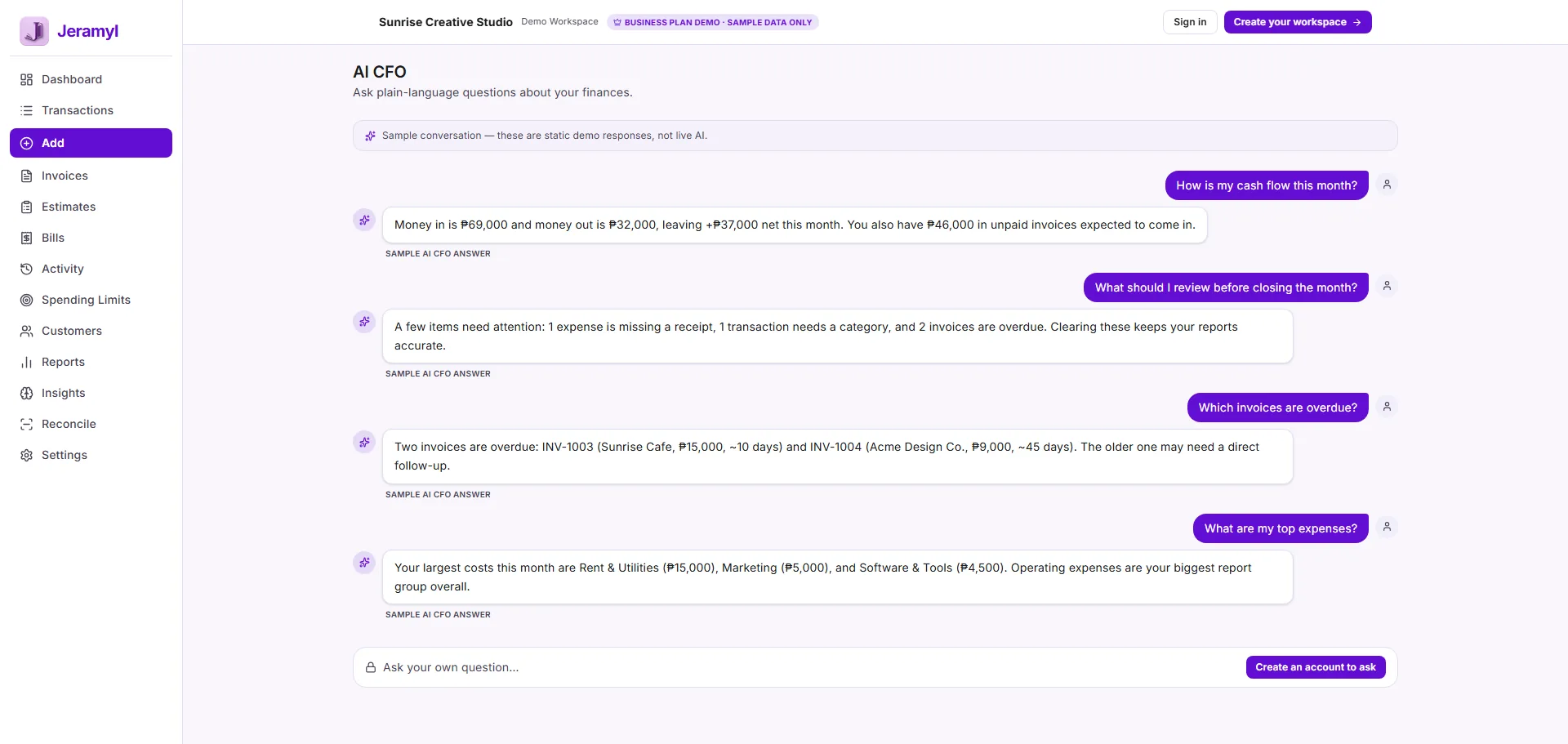
The AI Assistant is plan-gated and usage-limited. The number of questions you can ask per billing period depends on your plan. If you reach your limit, you can upgrade from Settings → Billing. See the Pricing page for a plan comparison.
Ask clear bookkeeping questions
The quality of the AI Assistant's answer depends on how clearly you ask the question. Vague questions produce vague answers. A well-formed question includes what you want to know, the time period you care about, and — if you have multiple workspaces — which business you mean.
What makes a good question
- A clear date range: "This month", "last quarter", "June 2026", or "year to date" all give the AI a defined period to work with. A question with no date range may return a result based on all available records, which may not be what you intended.
- A specific subject: "Expenses" is broad. "Software subscription expenses" or "expenses in the Marketing category" is specific. More specific questions tend to produce more useful answers.
- The workspace name if relevant: If you manage multiple businesses in Jeramyl and want the answer for a specific one, mention the business name or confirm the right workspace is active before asking.
- What you want to understand: "What was my largest expense category last month?" is clearer than "Tell me about expenses". The AI responds better to direct questions with a defined goal.
If an answer does not look right, try rephrasing the question with more specifics — a clearer date range, a more precise subject, or a different framing. Asking follow-up questions in the same session often produces better results than starting over.
Ask about income, expenses, invoices, bills, and reports
The AI Assistant can respond to questions about the financial records in your workspace. It reads from your transactions, invoices, bills, and report data to form its responses.
Income and expenses
Ask about total income or expenses for a period, spending by category, largest income sources, top vendor spend, or whether income is trending up or down based on recorded transactions.
Invoices
Ask about overdue invoices, the total amount outstanding, invoices due this week or month, or which customers have unpaid invoices. The AI reads from the invoice records in your workspace.
Bills
Ask about upcoming bills, which bills are overdue, or the total amount owed to vendors. The AI reads from the bill records in your workspace.
Cash flow and runway
Ask for a plain-language summary of your current cash position, the difference between cash in and cash out for a period, or what the current runway signal shows. These answers are based on recorded transactions — not your bank account balance unless you have linked a bank connection.
Reports
Ask the AI to explain a number you see in a report, summarise the Profit & Loss for a period, or describe which categories are contributing most to your expenses. The AI reads from the same underlying transaction data as your reports.
AI answers depend on the records available in your workspace. If transactions are missing, uncategorized, or recorded in the wrong period, the answer will reflect those gaps. The AI does not independently verify your records against your bank or any external source. Always review the underlying records before relying on an answer. See the Transactions and Categories guide for keeping records accurate.
Ask about cleanup items
The AI Assistant can surface information about flagged items in your workspace — transactions that need a category, invoices without a linked customer, expenses with missing receipts, or items in your Month-end Cleanup queue.
Asking the AI about cleanup items is a fast way to get a summary of what needs attention without navigating to each section individually. Some examples:
- How many transactions are currently uncategorized?
- Which expenses are missing receipts this month?
- What is still in my Month-end Cleanup for last month?
- How many income transactions have no customer linked?
Once the AI tells you what needs attention, go to the relevant section — Transactions, Month-end Cleanup, or the Dashboard alerts — to resolve the items directly. The AI cannot make changes on your behalf.
The AI reads from the flagged item data available in your workspace at the time of the question. If you have just resolved items, the AI may not reflect those changes immediately — give the workspace a moment to update before asking a follow-up question about the same items.
Review AI answers carefully
AI-generated answers are not guaranteed to be correct. Before relying on an answer from the AI Assistant — especially for a financial decision, a conversation with your accountant, or a tax-related question — review it against the source records in Jeramyl.
What can make an answer less reliable
- Incomplete records: If transactions have not been entered, the AI cannot include them in its answer. Income or expenses missing from your workspace are invisible to the AI.
- Uncategorized transactions: Transactions without a category may not appear correctly in category-based answers. The AI works with the categories you have assigned — uncategorized items are a gap.
- Wrong dates or amounts: A transaction with an incorrect date or amount affects any answer that covers the period or totals that transaction.
- Multiple workspaces: The AI reads from the active workspace. If the question applies to a different business, confirm the right workspace is selected before asking.
- Ambiguous questions: A question that could be interpreted multiple ways may produce an answer based on a different interpretation than you intended. Rephrasing with more detail usually helps.
AI answers are not always correct and should not be treated as authoritative. Always review the source records in Jeramyl to confirm what the AI is telling you before acting on the answer. For tax questions, legal questions, or major business financial decisions, confirm with a qualified accountant, bookkeeper, tax professional, or financial advisor.
Check the source records
When the AI Assistant gives you an answer — especially one involving a total, a count, or a date-based summary — the best way to confirm it is to navigate to the source records and verify.
How to verify an AI answer
- Note the specific claim the AI made — a total amount, a category name, a count of invoices, or a date range.
- Navigate to the relevant section in Jeramyl: Transactions, Invoices, Bills, Reports, or Month-end Cleanup.
- Apply the same filter — date range, category, status — that matches the question you asked.
- Compare the result you see in the source records to what the AI told you. If they match, you can be confident the answer is drawing from complete records. If they differ, check for missing transactions, wrong dates, or uncategorized items that may explain the gap.
If an AI answer surprises you — a number that looks too high or too low — treat that as a prompt to review the underlying records rather than accepting or dismissing the answer outright. The discrepancy often points to a real issue in your records that is worth fixing.
What the AI Assistant does not do
- The AI Assistant does not guarantee that answers are correct. Answers are based on the records available in your workspace. Incomplete, uncategorized, or incorrect records produce incomplete or inaccurate answers. Always verify important answers against source records before relying on them.
- The AI Assistant is not a replacement for an accountant, bookkeeper, tax professional, or financial advisor. It helps you understand what is in your Jeramyl records. It does not give professional financial advice, tax advice, legal advice, or guidance on how to treat specific transactions for regulatory or compliance purposes.
- The AI Assistant does not provide tax advice. It can tell you what your records show. It cannot tell you whether an expense is tax-deductible, how to file a tax return, what your actual tax liability is, or how to handle a specific tax situation. For tax questions, consult a qualified accountant or tax professional.
- The AI Assistant does not provide legal or financial advice. For business financial decisions — borrowing, investing, hiring, restructuring — consult a qualified financial advisor. The AI Assistant describes your records; it does not advise on what decisions to make.
- The AI Assistant cannot take irreversible actions automatically. It is read-only. It cannot create, edit, or delete transactions, invoices, bills, or any other records. Every change to your data requires your action in the relevant section of Jeramyl.
- The AI Assistant cannot access data outside your workspace. It does not have access to your bank account, external systems, other Jeramyl workspaces, or information you have not recorded in Jeramyl. Its answers are limited to what is in your active workspace.
- The AI Assistant does not replace regular record review. Asking the AI about your records is not a substitute for reviewing your transactions, running Month-end Cleanup, or reconciling your records against your bank statement. Those tasks still need to be completed by you.
Best practices for better answers
- Keep your records current before asking the AI. The AI can only answer based on what has been recorded — missing transactions, unrecorded bills, or invoices not yet entered will produce gaps in answers.
- Assign categories to all transactions before asking category-based questions. Uncategorized transactions are invisible in category breakdowns.
- Specify a date range in your question. Without one, the AI may draw from all available records rather than the period you intended.
- Confirm the right workspace is active if you manage multiple businesses. The AI reads from the active workspace only.
- Ask one question at a time. A focused question — "What was my total marketing spend in May 2026?" — produces a more reliable answer than a compound question combining multiple topics.
- If an answer surprises you, check the source records before drawing a conclusion. A surprising number may point to a missing or incorrect transaction rather than an AI error.
- Use AI answers as a starting point, not a final authority. For any important figure — one you plan to share with your accountant, use in a business decision, or reference in a filing — verify it in the source records.
- For tax, legal, or major business decisions, confirm with a qualified professional rather than relying on AI-generated summaries.
Example questions to ask
These are examples of the kinds of questions you can ask the AI Assistant. They are not guaranteed to produce specific results — the response depends on what records are available in your workspace.
Income and expenses
Invoices and bills
Cash flow and runway
Cleanup and records
These examples are illustrations. The AI Assistant's ability to answer a specific question depends on what records exist in your workspace and how completely they have been filled in. An answer is only as reliable as the records behind it.
FAQ
No. AI answers are based on the records available in your workspace and are not guaranteed to be correct. Incomplete records, uncategorized transactions, or incorrect dates can produce inaccurate answers. Always verify important answers against the source records in Jeramyl — go to Transactions, Invoices, Bills, or Reports and check the figures directly before relying on an AI-generated response.
No. The AI Assistant can tell you what your records show — total expenses in a category, income for a period, or what the Tax Summary estimate contains. It cannot tell you whether an expense is tax-deductible, what your actual tax liability is, or how to handle specific tax situations. For tax questions, consult a qualified accountant or tax professional.
No. The AI Assistant is read-only. It provides answers and summaries but does not create, edit, or delete transactions, invoices, bills, or any other records. Every change to your data in Jeramyl requires your direct action in the relevant section.
If an AI answer differs from a figure in your reports, check the following: the date range you asked about versus the date range shown in the report; whether any transactions are uncategorized or missing from the period; and whether the right workspace is active. Differences often point to a records gap rather than an error in either the AI or the report. Fixing the underlying records will bring both into alignment.
No. The AI Assistant reads from the records in your Jeramyl workspace only. It does not have direct access to your bank account, external accounts, or any data source outside Jeramyl. If you have set up a bank connection and transactions have been imported, those are visible because they are now records in your workspace — not because the AI can reach your bank independently.
You can share an AI-generated summary as a starting point for a conversation, but verify the figures in the source records before presenting them as authoritative. Your accountant works from verified records, not AI summaries. If an AI answer produces a figure you want to discuss, navigate to the relevant section in Jeramyl — Transactions, Reports, or Invoices — to confirm the underlying data before your meeting.